
KWGT Kustom Widget Maker
Kustom IndustriesPersonalization
3.92.37K Reviews
- Version
- 3.82b621115
- Installs
- 10.00M
- Age Rating
- Everyone
Screenshots
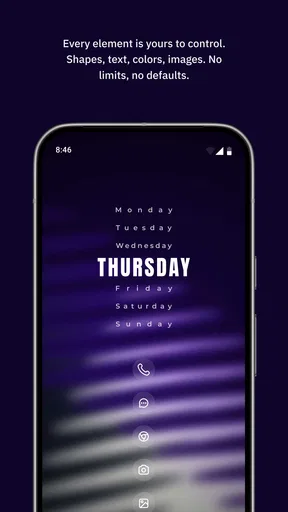
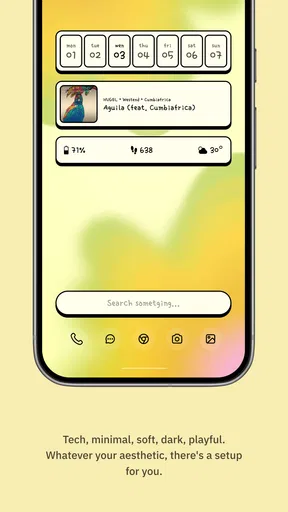
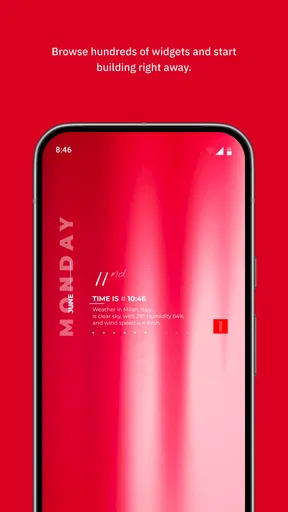
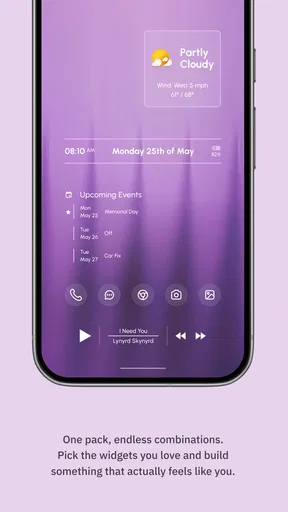
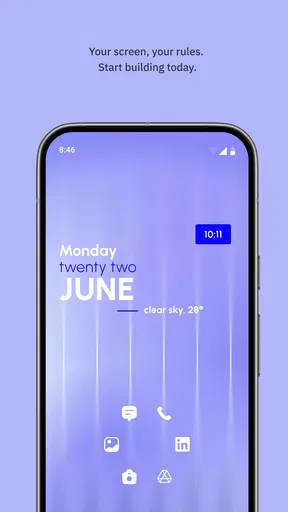
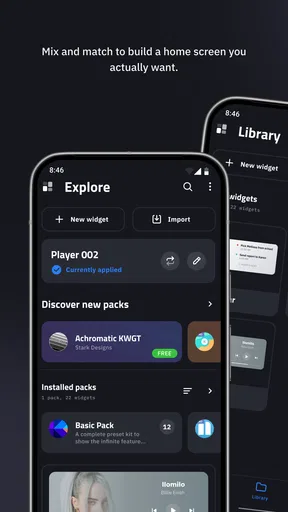
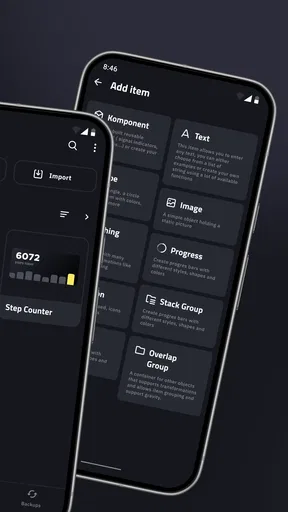
Our Review of KWGT Kustom Widget Maker
 Analysis by Appyee
I’d approach KWGT Kustom Widget Maker as a small creative project rather than a quick theme switch. It’s a free Android personalization app from Kustom Industries, and its appeal is the freedom to shape home-screen widgets around the information and look I actually want. If you enjoy adjusting details, that freedom can be satisfying; if you just want a finished clock with no setup, it may feel like more work than you need.
What to expect from a custom widget
The first useful distinction is that KWGT is a maker, not simply a gallery of ready-made widgets. You can begin with a template or build a design yourself, then arrange text, shapes and data into a layout that suits your screen. That makes it different from the standard clock or weather widgets that come bundled with a phone: those are usually faster to place, but offer fewer ways to change their appearance and information.
There is a practical trade-off here. A prebuilt widget can get you to a usable result immediately, while a custom one takes thought about spacing, contrast and what deserves a place on the home screen. I find KWGT most worthwhile when I have a clear purpose, such as combining a clock with weather or making a compact panel that keeps useful details visible without opening several apps.
The app’s store summary points to clocks, weather, activity tracking, steps and sleep as possible widget subjects. Treat those as ideas for what you might want to surface, not a promise that every design will suit every routine. The value is in choosing a small amount of information and presenting it in a way that works for you, rather than filling the screen just because the editor offers many options.
A calm first setup
When you first open the editor, it is easy to mistake the number of controls for a requirement to understand everything at once. I’d keep the first attempt deliberately small: pick one template, decide what you want it to show, and change only a couple of visual details. A clock with a clear time display is a better first project than an elaborate dashboard with several data elements competing for attention.
Before designing, make room on your home screen for the widget and think about the wallpaper behind it. A design that looks clear in the editor can become hard to read over a busy image, so contrast matters more than decorative detail. If the preview feels crowded, remove an element rather than shrinking everything until it is difficult to see.
KWGT is free to install, and the app is rated for Everyone. Optional in-app purchases are listed at $6.99 per item, so I’d start with the basic experience and decide whether I want to spend anything only after I know how often I’ll use the editor. It has an average rating of 3.9 from around 49,000 ratings, with roughly 2,300 written reviews and over 10 million installs; those figures suggest a sizable audience, but they don’t tell you whether its hands-on style will match your own preferences.
Your first satisfying result
For a first success, make one widget that solves a small everyday annoyance. I might build a clock that is easier to read at a glance, or a weather display that fits the colors of my home screen. The preview is especially helpful here: I can adjust text size, placement and shapes, then judge the composition before settling on it.
A useful workflow is to make a simple version, place it on the screen, and live with it for a day before adding more. That test catches problems that are easy to miss while designing: a label may be too small, an element may disappear against the wallpaper, or the layout may take up more attention than the information deserves. A restrained widget often feels more polished than one that tries to show everything.
For example, on a busy morning I might want to check the time and weather without opening separate apps. A single, readable widget can make that glance feel more convenient, while the rest of the screen stays uncluttered. The point is not to reproduce a full app on the home screen; it is to make one useful detail easier to reach.
Where the learning curve shows
The main friction is the gap between having a visual idea and knowing which controls will produce it. KWGT gives room to change layouts, fonts, shapes and data, but that range can make the first session feel less direct than choosing one of the phone’s built-in widgets. I’d treat experimentation as part of the process and avoid judging the app by how quickly I can make a complex design on day one.
It also helps to separate appearance from usefulness. Adding more objects can make a widget look impressive in a preview while making it harder to scan on a real home screen. I’d check the result at its actual size and in its usual setting, then remove anything that does not help me recognize the information faster.
Another reasonable question is whether this is the right choice for someone who does not consider themselves a designer. I think it can be, provided they are happy to start with a template and make gradual edits. The app is not limited to experts, but it does reward patience; anyone who wants a finished widget in one tap may be happier with a built-in option.
Ideas for going beyond the first design
Once the first widget is working, I’d save its basic visual approach in my mind and reuse the same colors or text style in a second design. That creates a more coherent screen without requiring every widget to contain the same information. It is also a useful way to learn: change one part at a time, so you can tell which adjustment improved the result and which merely added complexity.
For an activity-focused screen, consider whether you really need several measures visible at once. A compact step or activity element may be more useful than a crowded collection of numbers, especially if you only check it occasionally. For a sleep-related design, the same principle applies: make the key item easy to spot and avoid treating the widget as a substitute for exploring the relevant app when you need more context.
Community tutorials and shared creations can help when you hit a design block. I’d use them as examples to learn a technique or get a starting point, then adapt the idea to my wallpaper, screen space and priorities. Copying a complicated design wholesale can leave you with a widget that looks appealing but is difficult to maintain or read.
Who will enjoy KWGT, and who may not
I’d recommend trying it if you like making your Android home screen feel personal and are willing to spend a little time refining details. It suits people who want more control than default widgets usually provide, especially when they have a specific combination of information or a visual style in mind. The current version is 3.81b530915, and it supports Android 8.0 and later.
I would skip it if your priority is simply to install a widget and never think about it again. A built-in clock or weather option is often the easier choice when its appearance and information are already good enough. KWGT’s flexibility is its strength, but it also means the user takes on more decisions; that is an enjoyable part of the app for some people and unnecessary effort for others.
After the first day, I’d ask myself whether the widget makes a frequent glance genuinely easier. If it does, keep it and consider a second design. If I find myself repeatedly adjusting small details without improving readability or usefulness, I’d stop there. Personalization should make the phone feel more comfortable to use, not turn the home screen into an endless project.
Have you ever found yourself staring at your phone’s home screen, wishing it could look a bit more… you? Well, let me introduce you to KWGT Kustom Widget Maker, the ultimate app to customize your Android device's widgets. I’ve been playing around with it, and let me tell you, it’s a game-changer.
What is KWGT Kustom Widget Maker?
So, what exactly is KWGT Kustom Widget Maker? Essentially, it’s an app that allows you to create custom widgets for your Android home screen. The beauty of this app is in its flexibility. You can design everything from simple clocks to complex interactive widgets that display real-time data.
When I first opened the app, I was greeted with a clean and intuitive interface. It might seem a bit overwhelming with all the options available, but it’s like a playground for creativity. You don’t need to be a professional designer to make something cool; the app makes it accessible for everyone.
Features Galore
Okay, let’s dive into the features because this is where KWGT Kustom Widget Maker really shines. The app offers a plethora of tools to customize every aspect of your widget:
- Layouts: Choose from pre-made templates or start from scratch. The drag-and-drop functionality is super user-friendly.
- Text Options: With a multitude of fonts and styles, you can make your text pop or keep it subtle.
- Shapes and Objects: Create stunning designs using various shapes and objects. The possibilities are endless.
- Data Integration: Want your widget to display the weather, calendar events, or battery status? No problem! You can integrate real-time data effortlessly.
- Animation: Add a touch of magic with animations that bring your widget to life.
One thing I really appreciated was the ability to preview changes in real-time. It makes the process of designing and tweaking widgets so much smoother.
Getting Creative
Now, let’s talk about the creative side of things. I spent hours playing around with different designs, from minimalist clocks to vibrant weather widgets. The app allows you to express your personality through your home screen, which I find incredibly satisfying.
The community around KWGT is also worth mentioning. There are tons of resources, including tutorials and forums where users share their creations. If you’re ever stuck or need inspiration, you won’t have to look far.
The User Experience
Navigating through KWGT Kustom Widget Maker is a breeze once you get the hang of it. The learning curve might be a little steep initially, but trust me, it’s worth it. The app does a fantastic job of balancing complexity with usability.
The performance is solid, with smooth transitions and minimal lag. I’ve tried it on several devices, and it runs like a charm on all of them. Plus, the app is regularly updated, which means new features and bug fixes are always around the corner.
Why You Should Try It
If you’re someone who loves personalizing their gadgets, KWGT Kustom Widget Maker is a must-try. It offers a level of customization that’s hard to find elsewhere. Whether you want to transform your home screen into a work of art or simply make it more functional, this app has you covered.
And hey, even if you’re not a design wizard, the app’s community and resources make it easy for anyone to create something unique and beautiful.
In conclusion, KWGT Kustom Widget Maker is not just an app; it’s a tool for self-expression. It lets you break free from the constraints of standard widgets and craft something that’s truly yours. Give it a shot, and who knows, you might just fall in love with your home screen all over again.
Privacy and Permissions
See what permissions an app requests and how it handles your data.
- Device & app history
- retrieve running apps
- Identity
- find accounts on the device
- Calendar
- read calendar events plus confidential information
- Contacts
- find accounts on the device, read your contacts
- Location
- approximate location (network-based), precise location (GPS and network-based)
- Phone
- directly call phone numbers, read phone status and identity
- Photos/Media/Files
- read the contents of your USB storage, modify or delete the contents of your USB storage
- Storage
- read the contents of your USB storage, modify or delete the contents of your USB storage
- Wi-Fi connection information
- view Wi-Fi connections
- Device ID & call information
- read phone status and identity
- Other
- view network connections, pair with Bluetooth devices, access Bluetooth settings, connect and disconnect from Wi-Fi, full network access, run at startup, control vibration, prevent device from sleeping, Google Play license check, read Google service configuration
Verdict
Strengths of KWGT Kustom Widget Maker
- Highly customizable widget options.
- Supports various widget sizes.
- Integrates with Tasker for automation.
- Vibrant community for user support.
- Frequent updates and bug fixes.
Limitations of KWGT Kustom Widget Maker
- Steep learning curve for beginners.
- Some features require in-app purchases.
- Can drain battery with heavy use.
- Limited templates in the free version.
- Occasional crashes on older devices.
Other Releases by Kustom Industries
View All
KWGT Kustom Widget Pro Key
Tools3.7

KLWP Live Wallpaper Pro Key
Tools3.9
Similar Picks in This Category
View All
Microsoft SwiftKey AI Keyboard
SwiftKey4.3

Wallpapers
Google LLC4.1

Zedge™ Wallpapers & Ringtones
Zedge4.7

Yandex Browser with Alice AI
Direct Cursus Computer Systems Trading LLC4.3

Ringtone Maker:create ringtone
Big Bang Inc.4.7

Fonts Keyboard
Fonts Keyboard3.9
Frequently Asked Questions
What is KWGT Kustom Widget Maker used for?
KWGT Kustom Widget Maker is an app that allows users to create custom widgets for their Android home screens. It offers a highly customizable interface, enabling the creation of unique widgets with various functions like clocks, weather updates, and system info displays. Perfect for users who want to personalize their devices.
Is KWGT Kustom Widget Maker user-friendly for beginners?
While KWGT offers extensive customization options, it might have a learning curve for beginners due to its vast features. However, the app provides tutorials and community support, making it easier to understand over time. New users can start with pre-made templates and gradually explore more advanced features.
Does KWGT Kustom Widget Maker require a premium version for full functionality?
KWGT offers a free version with basic features, but to unlock advanced functionalities, such as importing third-party widgets and removing ads, users need to purchase the KWGT Pro Key. The Pro version enhances the user experience by offering additional customization options and access to a wider range of tools.
Can KWGT Kustom Widget Maker impact device performance?
KWGT is designed to be efficient, but creating highly complex widgets can consume more battery and processing power. Users should monitor their widgets' performance and adjust settings if needed to optimize device performance. Regular updates aim to minimize resource usage while maintaining functionality.
How does KWGT Kustom Widget Maker integrate with other apps?
KWGT can integrate with various apps to display live data, such as weather, calendar events, and system information. It supports Tasker integration for automation and can work alongside other widget packs. This interoperability enhances the app's versatility, making it a powerful tool for personalizing your home screen.
